SP
Switch Port Mapper
See which MAC, IP and host sits on every switch port over SNMP v1, v2c and v3. A live faceplate shows PoE budget, VLANs and port mode, with alerts for link flaps, speed drops and rising CRC errors.
IODiag Pro 3.1 · native Windows
Switch port mapping, subnet scanning, LLDP/CDP discovery, 2D/3D topology, syslog and NetFlow/IPFIX/sFlow analysis in one native Windows workbench. No runtime, no Npcap, no cloud account. Built for air-gapped and high-compliance networks.
Perpetual license · 30-day money-back guarantee · No account needed for the trial
~2.4 MB
Single portable exe. Copies to a USB stick.
0 dependencies
No .NET, no Java, no Npcap, no drivers.
Offline
One-time activation, then no internet needed.
0 telemetry
No analytics. Scan results stay on your PC.
Field-tested on Cisco, Aruba and Cambium switching.
IODiag Pro
Every tool shares one adapter selection, one event log and one readable iodiag.ini. Bind every test to the exact NIC you mean.
See which MAC, IP and host sits on every switch port over SNMP v1, v2c and v3. A live faceplate shows PoE budget, VLANs and port mode, with alerts for link flaps, speed drops and rising CRC errors.
ARP, ICMP and TCP sweeps with host naming (PTR, NetBIOS, mDNS), vendor lookup and fingerprinting. Keeps scan history, finds rogue DHCP servers, and reads a router's routing table to list the subnets behind it.
"What port am I plugged into?" Answered by LLDP or CDP, either through an SNMP neighbor crawl or live wire capture through Windows' built-in Packet Monitor. No Npcap and no third-party driver.
Map routers, switches and access points across subnets from LLDP/CDP data. Orbit the map in 3D (OpenGL 2.1), collapse AP clusters, save maps, and export to draw.io.
Latency over time for many targets over ICMP, TCP or DNS, with switch-port error markers on the chart, trace route and path MTU discovery.
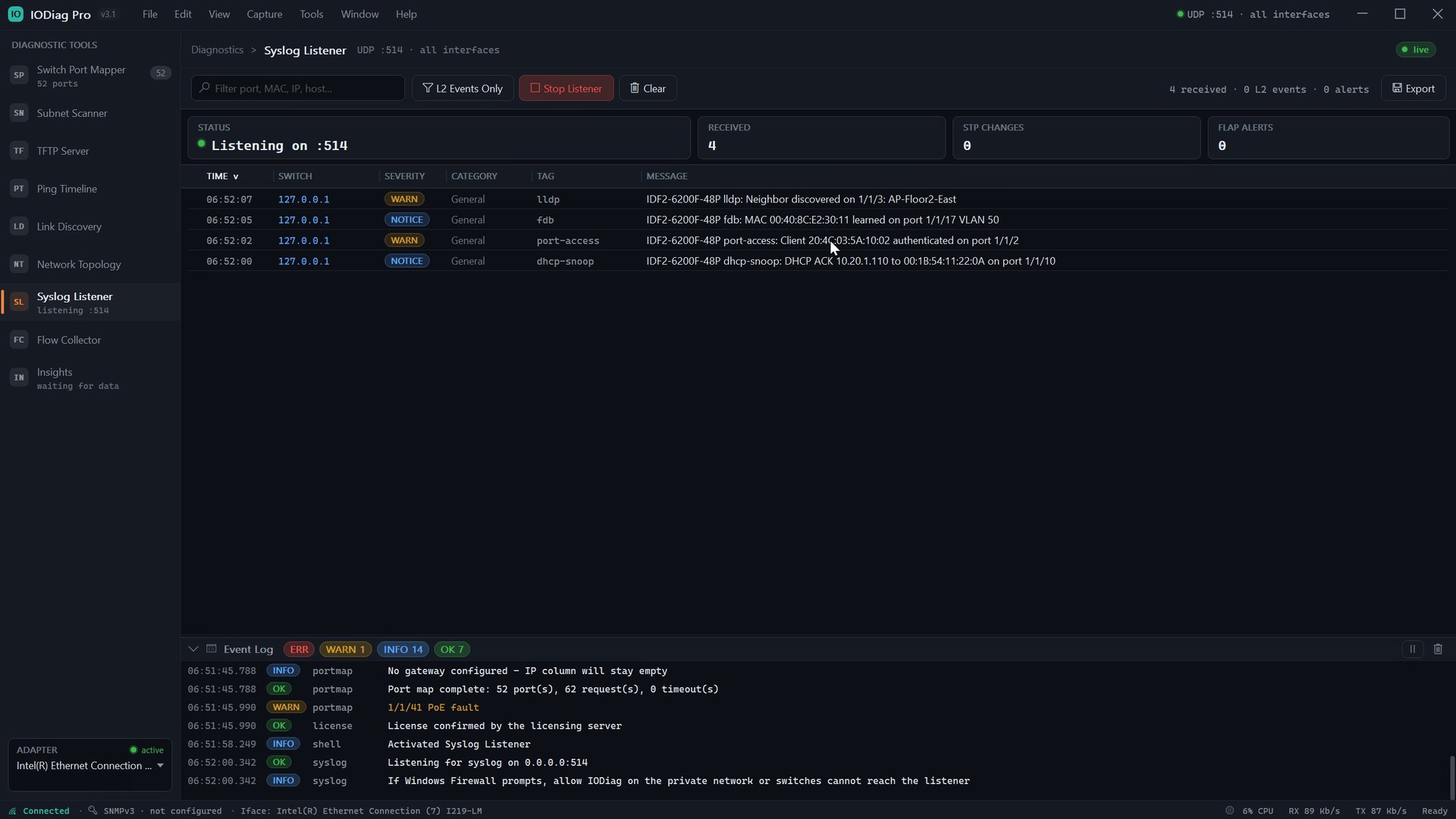
Receive and filter switch syslog in real time. Spanning-tree changes, LLDP neighbors, port-access and DHCP-snooping events are tagged so Layer 2 trouble stands out.
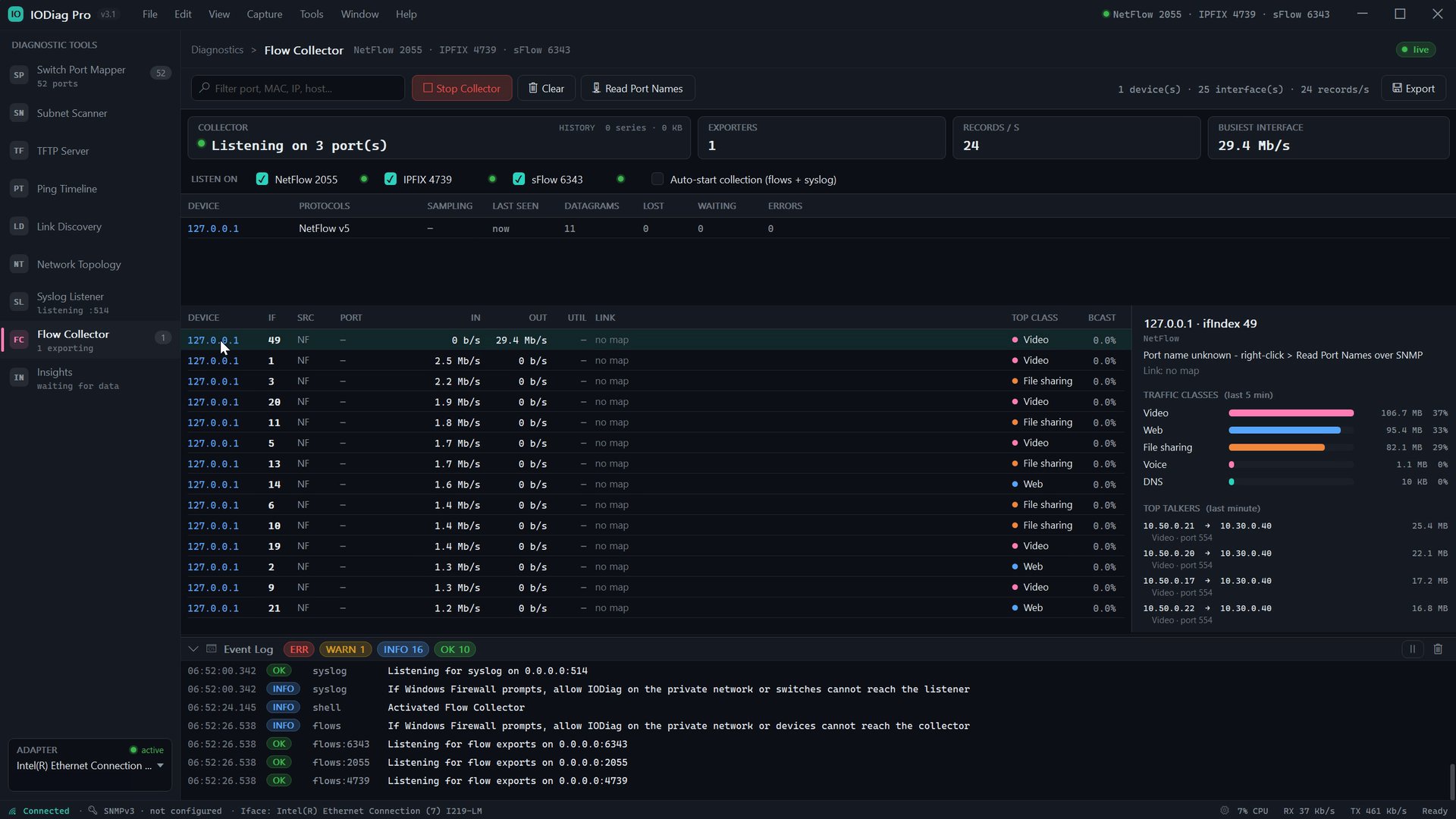
Collect NetFlow, IPFIX and sFlow side by side. Per-interface throughput, traffic classes, top talkers and traffic walls, with port names read over SNMP.
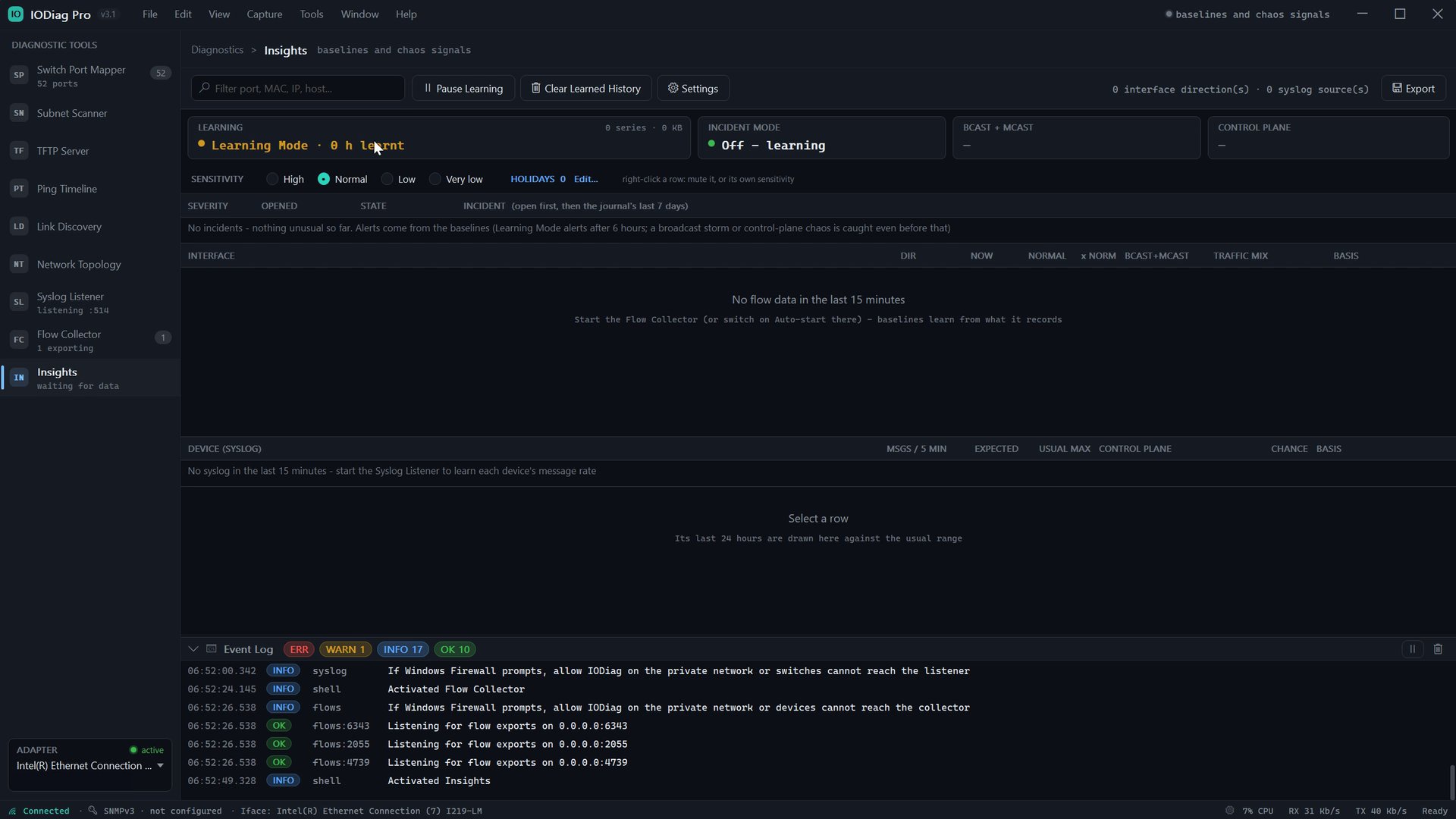
Learns what normal looks like for each link and each syslog source, then flags anomalies, broadcast storms and control-plane chaos. All on your machine, with no cloud.
Serve and receive switch firmware and configuration files without hunting for a separate TFTP tool.
A one-minute tour of the workbench.
Air-gapped & high-compliance
IODiag Pro runs entirely on your PC. Activate once with an internet connection, then take it into the plant room, the secure enclave or the isolated OT network. The license keeps working with no uplink.
No telemetry, ever
No analytics or usage data is collected. Scan results, maps and captures never leave your machine.
One narrow network call
Only activating, validating or deactivating a license contacts the license service: your key plus a one-way hashed machine ID. Nothing else.
Nothing extra to approve
No runtimes, packet-capture drivers or services to get past change control. Run it from the installer or the portable ZIP.
Least privilege by design
IODiag never runs elevated. Only LLDP/CDP wire capture uses a short-lived helper behind a single UAC prompt, and it cleans up after itself.
IODiag Server · Early access
IODiag Server takes the same diagnostics multi-site for enterprises and MSPs. Headless probes at each location report to one server you control, and the web console updates in real time.
Run it on your own hardware or in your cloud. Your monitoring data stays in your PostgreSQL database.
Drop a lightweight probe at each site. It collects locally and reports back to your server.
Live updates streamed to the browser. No refresh button, and nothing to install on the viewing PC.
Baselines and anomaly scoring run on your server, not in someone else's cloud.
One price per site. No per-device billing, so you aren't penalised when a site grows.
A native Free Pascal server with a small footprint and few moving parts.
Buy once. No subscription.
IODiag Pro
$199USD, one-time
Perpetual license for one Windows PC
Secure checkout by Lemon Squeezy. Sales tax / VAT calculated at checkout.
IODiag Server EARLY ACCESS
Flatper site
For enterprises and MSPs
Full features, no account, no credit card. Version 3.1.0.4.
Recommended. Start-menu shortcut and uninstaller.
SHA-256
6a56967934ba9144ce23c5d631e441f9770947e22f147751aef613bb24a7b4fc
No installer. Unzip and run, from a USB stick if you like.
SHA-256
fcc6bbce19d8e8289b41fa4b412138c3bfbcd9f116a48c142b24333f8c78e679
Requirements
Windows 10 version 1809 or later, or Windows 11, 64-bit. SNMP tools need SNMP enabled on the switch. The 3D map needs OpenGL 2.1; without it the 2D map still works.
Verify your download
In PowerShell: Get-FileHash .\IODiag-Pro-Setup-3.1.0.4.exe and compare it with the value above. If Windows SmartScreen shows a prompt, choose More info → Run anyway.
By downloading you agree to the End User License Agreement.
The core diagnostic tools stop until you enter a license key. Your settings, saved maps and history stay where they are, so buying picks up where you left off.
Yes. You pay $199 once and the license does not expire. There is no subscription.
Each license is active on one PC at a time, tied to a one-way hash of that machine's hardware ID. To move it, deactivate on the old PC and activate on the new one.
Yes, after activation. Activation needs one connection to the license service. After that, IODiag Pro runs fully offline, and being unable to reach the license service never locks the app.
No. LLDP/CDP capture uses the Packet Monitor driver already built into Windows, through a short-lived helper that asks for elevation once. Everything else uses standard Windows networking.
Any managed switch that speaks SNMP v1, v2c or v3 with the standard bridge MIBs, including Cisco's per-VLAN layout. It has been field-tested on Cisco, Aruba and Cambium switching. LLDP and CDP are both supported for discovery.
Only license activation, validation and deactivation, which send your license key and an anonymized machine identifier to Lemon Squeezy. There are no analytics and no usage tracking, and the app makes no other requests beyond the tests you run.
If you're not satisfied for any reason, ask for a full refund within 30 days of purchase. The license key is revoked when the refund is processed.
IODiag Server is in early access with enterprise and MSP pilots. Email sales@iodiag.net and tell us how many sites you manage.
Email support@iodiag.net for licensing, refunds or technical questions. To reach the founder directly, write to bert@iodiag.net.